 Nextra
Start
The desktop app: runs on your own computer
#The desktop app: runs on your own computer
The desktop app (Windows, first build) is the same nextra.structuralweb in its own window, plus a local engine: the analysis can run on your computer instead of the cloud engine. Big and slow runs (second order for every combination, a response spectrum, fire) are then limited only by your computer, and the types the cloud does not offer appear in the list.
You sign in with the same account as in the browser (the usual nextra.studio sign-in, inside the window). Your projects, files and results are the same ones: a run on your computer is stored in the project as any run is, so the browser, the phone and the assistant see it too.
#What you need
One of the two, on the same computer:
- Nextra Design installed in Python (
python -c "import nextra_design"works). Another Python: setNEXTRA_PYTHONto itspython.exebefore starting the app. - Docker running, with the engine image (
structuralweb-worker:local, or the image named inNEXTRA_ENGINE_IMAGE).
The app uses Nextra Design's Python when it finds it, else Docker.
#Running on this computer
- Open the Analysis tab. In the Type group there is an Engine list (only in the desktop app): Cloud engine or This computer.
- Choose This computer. The app starts the engine (a few seconds; with Docker up to half a minute the first time) and shows which one it uses: This computer (Python) or This computer (Docker). Without either, the choice is greyed out and the note says what to install.
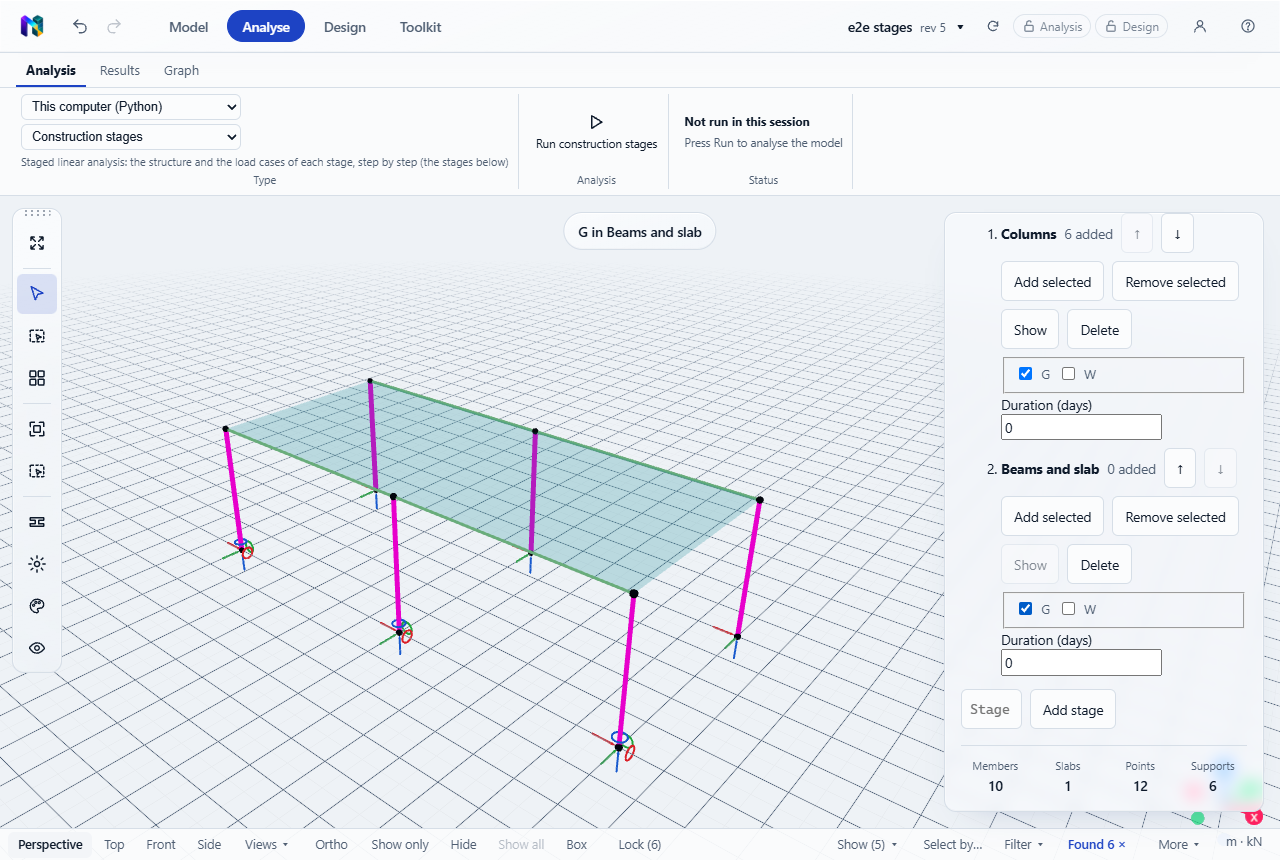
- The Type list now also offers Nonlinear (second order), Spectrum (EN 1998), Construction stages and Fire (EN 199x-1-2).
- Press Run. The run card says Reading the saved model, Running on this computer, Saving the results; the results open as after a cloud run.
Your choice is kept on this computer. Choosing Cloud engine again hides the local types (the type goes back to linear static).
#Nonlinear (second order)
Every ULS combination is solved with P-Δ (geometric non-linearity): no superposition. Results show as after a linear run; the run is labelled second-order (nonlinear) analysis.
#Spectrum (EN 1998)
The Response spectrum box below the ribbon sets the spectrum (type, ground, a_gR, γ_I, q, damping, β), the directions, how modes and directions are combined, the number of modes and the accidental torsion. Save the spectrum, then Run.
#Fire (EN 199x-1-2)
The Fire resistance box sets the checks on or off, the resistance (R15 to R240) and the ψ factor of the leading variable action (ψ₂, EN 1990 6.11b, or ψ₁). Save the fire settings, then Run: a fire run is always the analysis with the design checks. The fire checks appear in Design › Result as the family Fire. Which sides of a member or slab are exposed is its Fire sides design attribute (without it: 3 sides for beams, 4 for columns).
#Construction stages
The structure is built and loaded stage by stage (a staged linear analysis): an element added in a later stage starts without stress on the deformed structure and carries only the later loads. The Construction stages box below the ribbon lists the stages in order (↑ ↓ change the order):
- Add stage (a name, or Stage n).
- Add selected: select elements in the view (or with View › Select), then add them to a stage. An element is added in one stage only, so adding it to a stage takes it out of the others. Elements no stage adds are there from the first stage. Remove selected takes temporary elements (props, formwork) out at that stage. Show highlights a stage's elements.
- The load cases applied in the stage (ticks) and its Duration in days (creep between stages when long-term is on).
Every change is one undo step. Run construction stages then gives the states ST1, ST2 … and ST_final (characteristic) and their ULS states in Results, as other combinations.
#Limits
- One run at a time on your computer; a second waits for the first.
- A run's results are stored in the project only up to 24 MB (the same limit as opening a
.nxrfile). A bigger result is refused with that message: run the analysis without the design, or with fewer modes or combinations. - The app needs the internet for the account and the project (the model and the results are stored in the cloud, as in the browser). Working fully offline is the local-first plan (F1).
#Safety
The local engine listens only on your own computer (127.0.0.1), on a port chosen at each start, and answers only requests that carry a secret made at each start, which only the app knows. Web pages, other programs and other computers cannot use it. Only the nextra.structuralweb site inside the window can ask the app to run; a page from another site opened in the window cannot. The engine stops when you close the app.