 Nextra
The add-ons
Reaction transfer
Transfer selected support reactions into a target model as nodal point loads.
 Transfer selected support reactions into a target model as nodal point loads.
#How to use it
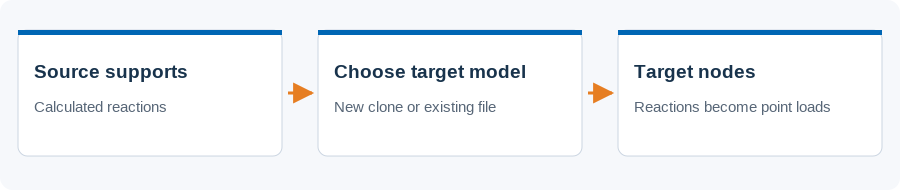
- Save and calculate the source model. Select the supports/nodes and geometry needed in the target.
- Open N. Reaction Transfer. Choose Create New File or Modify Existing File, then Browse for the target path.
- Choose linear, non-linear or envelope results. For envelopes, choose a component and Min/Max.
- For a new file choose whether to keep supports. For an existing file set the node-match tolerance. Press Transfer and review the confirmation and report.
#Dialog
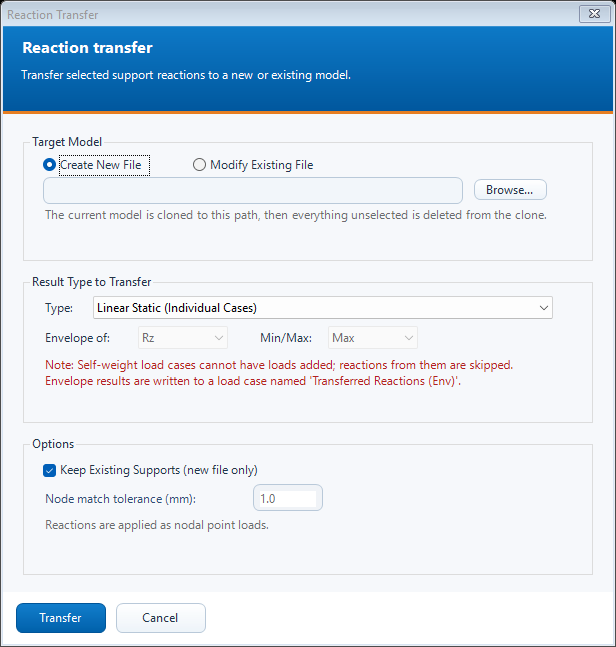
The screenshot is an offline preview with synthetic inputs. It is not a model-analysis result.
#Good to know
A new file starts as a clone and is trimmed to the selection. Existing-file mode backs up the target and adds reactions without trimming it; AxisVM finishes with the target open. The source is saved first. Self-weight load cases are skipped. Reactions retain their read sign; envelope loads use Transferred Reactions (Env).
Last updated 25 Oct 2026