 Nextra
The add-ons
End pin assign
Apply rotational hinges or semi-rigid releases at the free ends of selected chains.
 Apply rotational hinges or semi-rigid releases at the free ends of selected chains.
#How to use it
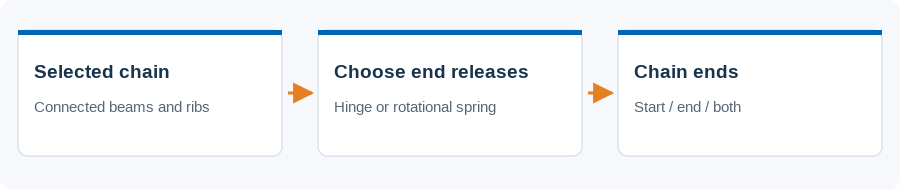
- Select the beam or rib chains, then open N. End Pin Assign.
- Choose Complete Pin or Semi-rigid Pin. For semi-rigid pins, enter the rotational stiffness in kNm/rad.
- Choose both chain ends, the chain start or the chain end. Enter the continuity angle tolerance.
- Review Modify intermediate releases (enabled by default). Enabled: every selected beam/rib is first made fully fixed at both ends, then only the chosen chain ends get the pin. Disabled: existing releases are kept (pins stay pins) and only the chosen chain ends are added or changed.
- Review Auto-orient, continuity against unselected lines and torsion release. Press OK and inspect the summary.
#Dialog
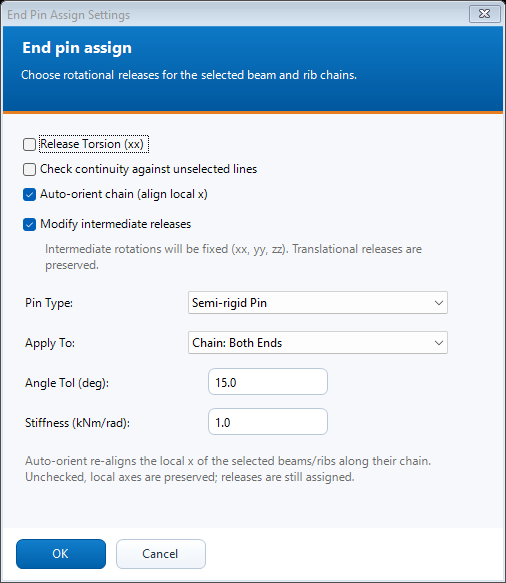
The screenshot is an offline preview with synthetic inputs. It is not a model-analysis result.
#Good to know
Auto-orient is enabled by default and realigns selected beam/rib local x axes. Disabling it preserves local axes. Torsion is released at most once per chain. Existing translational releases are preserved. Branched and closed-loop selections cannot always define a unique start/end.
With modification enabled the reset covers the whole selection, including intermediate joints, the untargeted end for Start/End Node Only, and ends excluded by the model-continuity check. Unselected lines are never changed. The summary reports how many line ends were reset to fixed.
Last updated 25 Oct 2026