 Nextra
The add-ons
Connection loads
Find critical member-end loads and keep the full concurrent force/moment vector.
 Find critical member-end loads and keep the full concurrent force/moment vector.
#How to use it
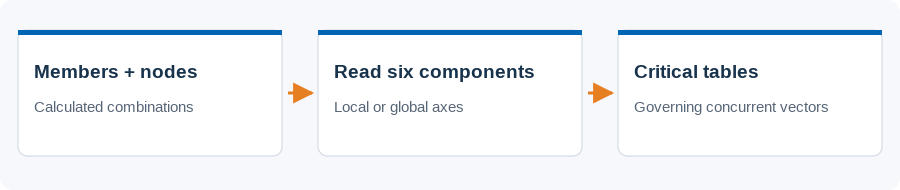
- Calculate the load combinations. Select the beams/ribs, optionally also the nodes whose member ends you need. With no selected nodes, both ends are included.
- Open N. Connection Load Extractor, tick the combinations and choose linear/non-linear results and local/global axes.
- Press Extract. Read Summary, the six component tabs, All and Checks. Each critical row includes its combination and concurrent six-component vector.
- Use Export all or Export critical for CSV, Copy tab for TSV, or Select in model to highlight the rows. The result window stays open while you inspect AxisVM.
#Dialog
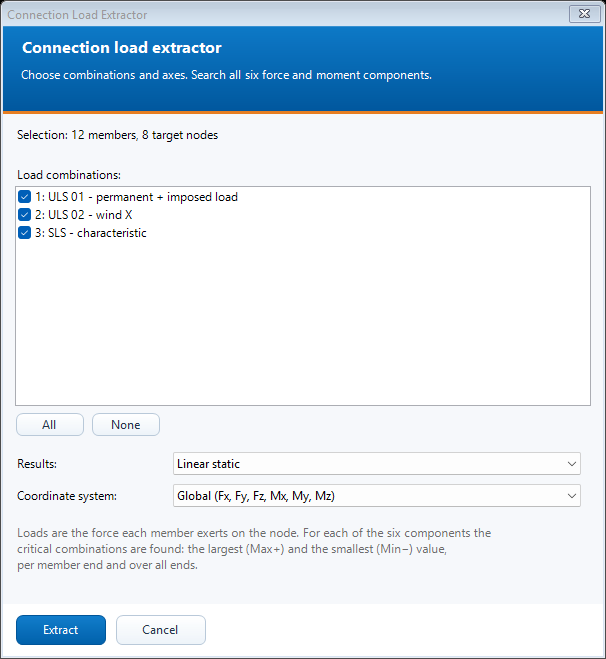
The screenshot is an offline preview with synthetic inputs. It is not a model-analysis result.
#Good to know
The reported loads are the forces each member exerts on its end node. Critical Max+/Min- values are searched independently for every component; concurrent values come from the same governing combination. Extraction does not edit geometry or loads. Select in model replaces the current selection. Inspect Checks for missing results, frame warnings and sign checks.
Last updated 25 Oct 2026