 Nextra
Up to 14.7×
Token-lean by design
Replies are compact, so long sessions stay fast and cheap. In a 19-case test it used about 16k tokens where other Rhino connectors used 77k and 238k.

 Rhino
 Grasshopper
Your ChatGPT or Claude starts working inside Rhino and Grasshopper. Describe a change in plain words and the model, the definition or the script is built on your canvas, with undo.
No extra subscription. ChatGPT: any plan, also free. Claude: a paid plan (Pro or higher), needed for Cowork.
Up to 14.7×
Replies are compact, so long sessions stay fast and cheap. In a 19-case test it used about 16k tokens where other Rhino connectors used 77k and 238k.
No extra bill
ChatGPT works on any plan, also free. Claude needs a paid plan (Pro or higher), because plug-ins run in Cowork. Nothing to host and no tokens to buy.
8 × 8
Every picture carries an 8×8 grid and short tags such as r12 and g4. In a crowded view it counts per cell, then zooms in on the part you mean.
Docs search
It searches Grasshopper components and their ports, the Rhino API (RhinoCommon, Grasshopper SDK, rhinoscriptsyntax), your documents, workflows and script library.
Python 3 + C#
It runs Python 3 and C# in Rhino, and your own scripts folders are available to it, so what you already wrote keeps working.
Every step
Each model and definition edit gets a checkpoint you can return to, separate from Rhino's own undo.
Real results, each made from one plain request.
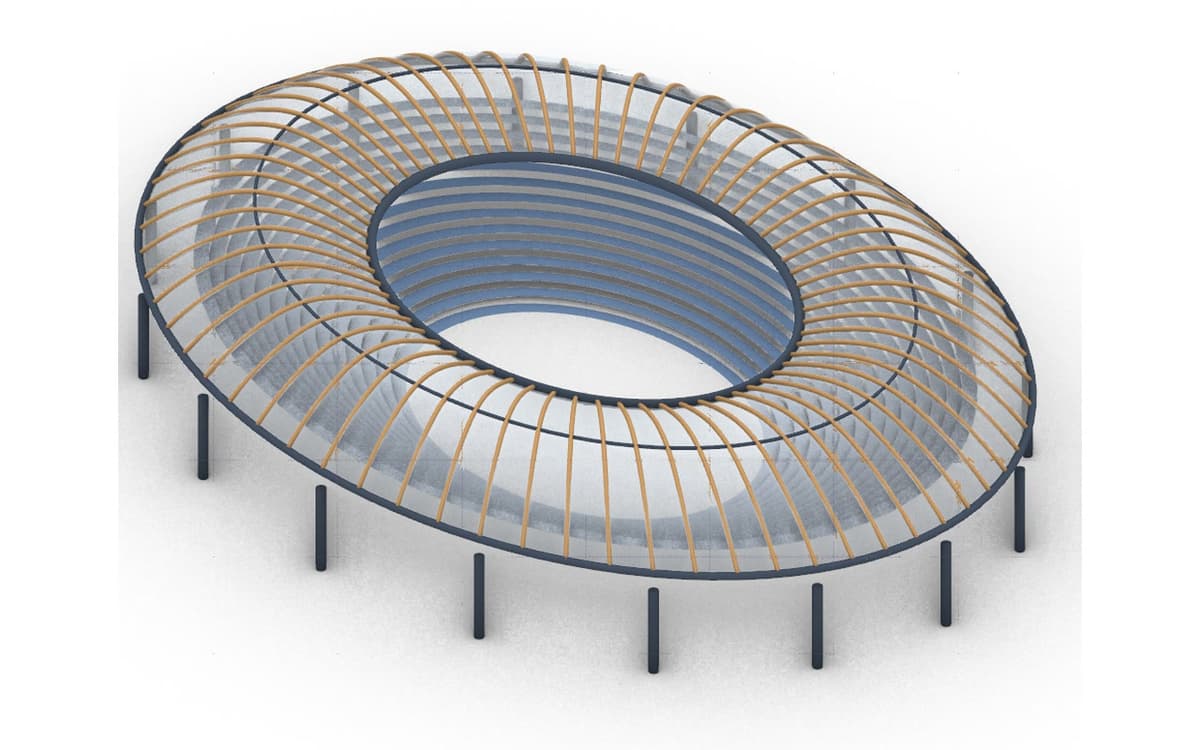
64 curved timber ribs, steel rings and a glazed membrane over the seating.
News20 Nov 2026
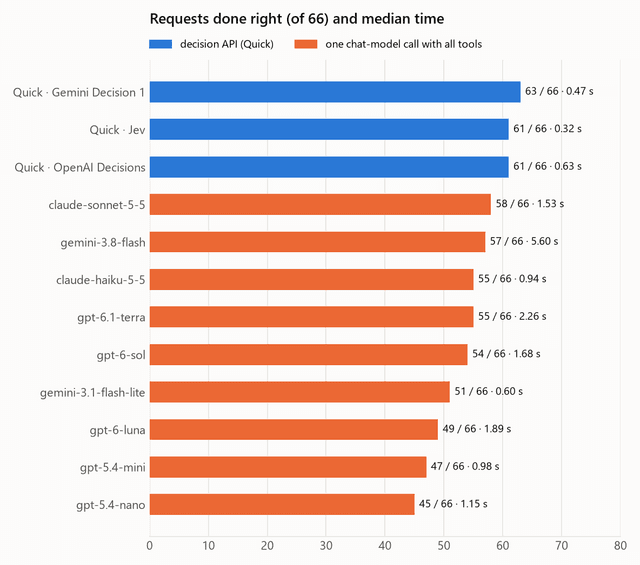
We graded Nexiy’s assistant on 66 Rhino and Grasshopper requests against nine chat models. Quick mode with a decision model got up to 63 right in under half a second, for under a dollar per thousand requests; the best single call (Claude Sonnet) got 58 at $26.63.
How-to20 Nov 2026
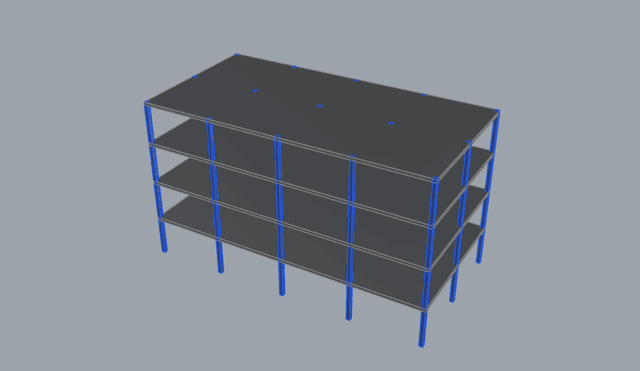
One sentence in Nexiy’s panel built 15 columns and 4 floor slabs in 13 seconds; a second sentence measured the slabs: 298.89 m³. LLM mode, your own OpenAI key, every step undoable.
How-to20 Nov 2026
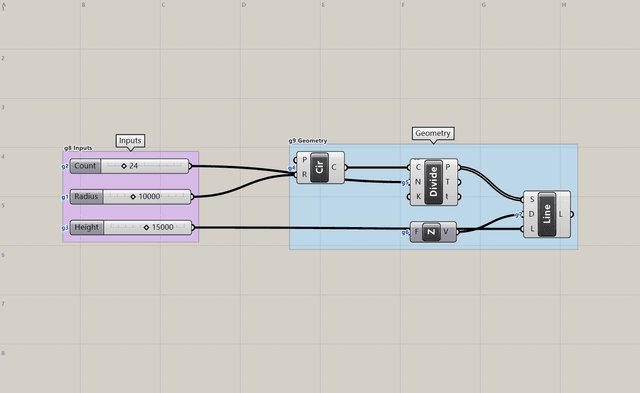
In CLI mode, Nexiy’s panel hands your request to Claude Code on your own computer. One sentence became a grouped, tidied Grasshopper definition with 24 baked lines, in 17 seconds and no API key.
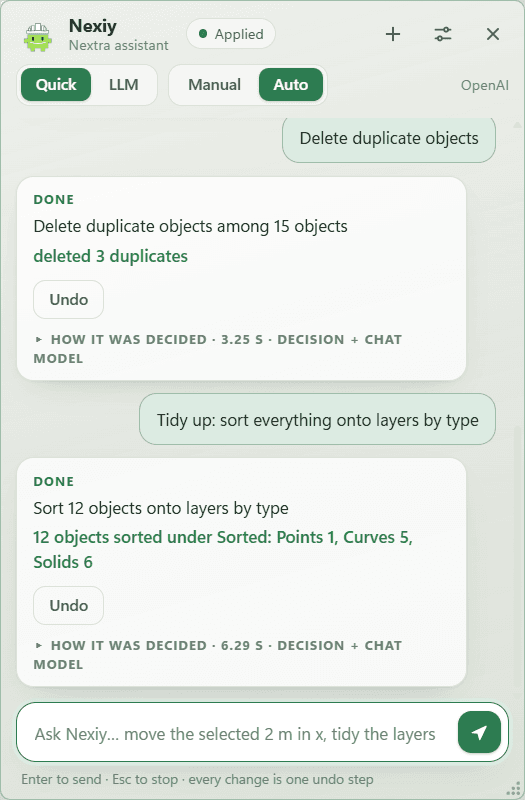
How-to20 Nov 2026
Empty layers, duplicate objects and everything on Default: Nexiy’s assistant in Quick mode cleaned it up in four sentences, each one an undo step, the first edit in 0.28 seconds.
0.2.2, released 20 Nov 2026
Rhino: open PackageManager and update. AI app: marketplace installs update on their own. If you used the ZIP, download it again and upload it over the old one.
0 open, 0 fixed.
See issues or report oneA click on Nexiy opens the panel, and it only shows what you can use.
CLI mode: pick the model from a list. Under the CLI list, a Model dropdown shows the models of Claude Code, Codex or Gemini CLI; "other…" takes any name.
Claude as the chat model accepts every typed Rhino and Grasshopper function now (schema limits of Claude's strict tools handled).
Everything of 0.2.1 is included (pictures in the chat: snip any screen, draw, paste). How-to: docs/assistant.md and nextra.studio (Rhino & Grasshopper, Documentation).
Nexiy
Pictures in the chat. Show Nexiy what you mean:
One click on Nexiy opens the assistant once it is set up; a second click closes it. Before that, and on a right click, Nexiy shows its menu (set up, status, size, liveliness, speed, hide).
Fixes
**…**.The how-to guide: docs/assistant.md, and on nextra.studio (Rhino & Grasshopper, Documentation). Downloads: the plug-in ZIPs and the .mcpb are below; the Rhino plug-in installs from PackageManager (Windows and Mac).
Meet Nexiy. The status dot in the corner of Rhino is now Nexiy, Nextra's little engineer. Nexiy shows the connection by colour: lime when an AI is connected, amber when it is ready, red and worried when the connection is down. Click Nexiy for the status, the size, how lively it is, its speed, and Hide. NextraRhinoGh > Nexiy brings it back.
Nexiy, the assistant inside Rhino (optional). Click Nexiy, then Open assistant. The panel opens out of Nexiy and asks how to connect:
The assistant has two modes:
Changes are applied at once (Auto) or after Apply (Manual), and every change is one undo step.
Skills and connectors. Add skills from a ZIP, a .md file or a GitHub link; they update themselves. Add MCP connectors. The Nextra Design switch connects its AI skill and its tools in one go.
Your setup is unchanged. Claude, ChatGPT and Codex keep working through NextraRhinoGh as before, and the assistant is entirely optional. The new ops tool is a typed function menu that any AI client can use.
The setup guide is on nextra.studio. Downloads: the plug-in ZIPs and the .mcpb are below; the Rhino plug-in installs from PackageManager (Windows and Mac).