 Nextra
 Install Nextra Design
About 5 minutes from download to your first analysis.
- Windows
- Rhino 8
- About 1.5 GB free disk space
- Internet for the first start, or the offline file
Install the plug-in in Rhino
- In Rhino, type PackageManager and press Enter.
- Tick Include pre-releases: the beta is a pre-release.
- Search for nextra-design and click Install.
- Restart Rhino.
Set up the calculation engine
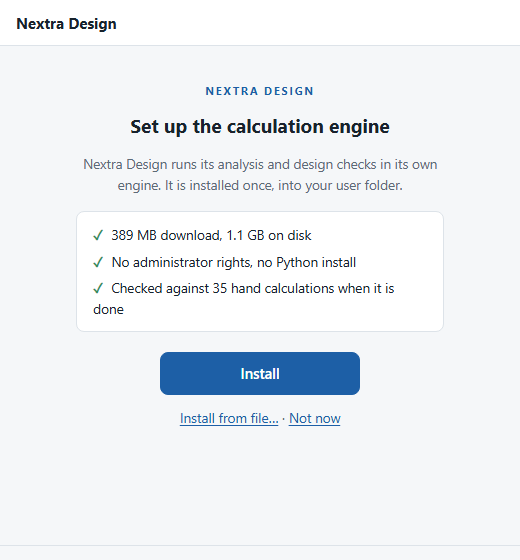
- Type NxPanel to open the Nextra Design panel. It shows Set up the calculation engine.
- Click Install. It downloads about 370 MB once into your user folder, checks the download and runs 35 hand-calculation checks. This takes a few minutes. No administrator rights and no Python install are needed.
- When it says Ready to go, you can start. Open an example model shows you a finished model.
Without internet on the Rhino computer
- Download the engine file below in a browser, for example on another computer.
- In the panel, click Install from file and pick the ZIP. The same checks run.
Optional: connect Claude or ChatGPT to Rhino
- Claude or ChatGPT can draw the geometry in Rhino or Grasshopper, give it supports, loads, materials and sections, run the analysis and the design, and explain the results, while you watch and decide in the Nextra panel.
- Install Nextra RhinoGh for your AI app first: it connects the AI app to Rhino 8 and Grasshopper. Its page has the steps.
Optional: add the Nextra Design skill to your AI app
- Download the Nextra Design skill below. It teaches the AI how to use Nextra Design: building in Rhino, in Grasshopper or both at once (a fixed part drawn in Rhino with a parametric part in Grasshopper), every Grasshopper component, tested step-by-step workflows, showing results in the panel, and what each message means.
- Claude: Settings, Capabilities, Skills, upload the ZIP. ChatGPT: add the ZIP where your app lets you add skills. Keep the ZIP as it is (do not unpack it).
- Ask for example: Build a 6 m steel beam in Grasshopper with Nextra Design, load it with 5 kN/m and check it to EC3. By default the AI only proposes changes to a model drawn in Rhino; you apply them in the panel (Agent card).
If something does not work
nextra-design is not found in the Package Manager
Tick Include pre-releases. If it is still missing, update Rhino 8 (Help, Check for Updates) and search again.
The download stops or fails
Check the internet connection and click Try again. Behind a company firewall: download the engine file in a browser and use Install from file.
Not enough disk space
The install needs about 1.5 GB for a moment. Free up space on the drive with your user folder and click Try again.
An analysis is still running
Let it finish or cancel it, also in other Rhino windows, then click Try again.
The self checks did not pass
Your previous setup is kept. Click Copy log and send it to us on the issues page.
How do I update?
Update nextra-design in the Package Manager. If the panel then shows Update available, click Update.
How do I remove it?
Uninstall nextra-design in the Package Manager, then delete the folder NextraDesign in %LOCALAPPDATA%.