 Nextra
Install Nextra Toolbox for AxisVM
About 3 minutes from download to your first analysis.
- Windows
- AxisVM X8
- Rhino 8.6 or newer (for the Rhino plug-in)
Download the toolbox
- Download the ZIP and extract it anywhere, for example your Downloads folder.
Install the AxisVM add-ons
- Close AxisVM.
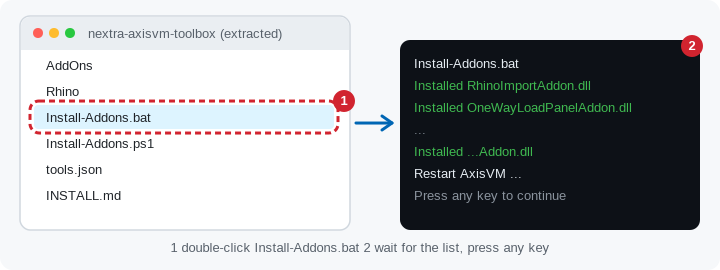
- Double-click Install-Addons.bat in the extracted folder.
- If Windows says “protected your PC”, click More info, then Run anyway.
Install the Rhino plug-in
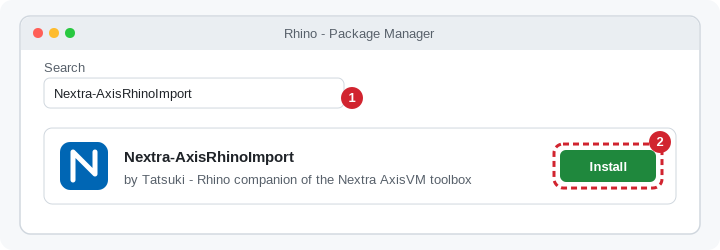
- In Rhino, type PackageManager and press Enter.
- Search for Nextra-AxisRhinoImport and click Install.
- Restart Rhino. Start AxisVM and the tools appear in its add-on menu.
If something does not work
AxisVM shows no tools
Right-click the DLL, open Properties, tick Unblock, then restart AxisVM.
AxisVM is not in C:\AXISVM X8
The installer asks for the folder. Drag the AddOns folder onto Install-Addons.bat.