 Nextra
How-to25 Oct 2026
An arch bridge, analysed from a description
How a sentence becomes a model, an analysis and a picture of the axial forces in AxisVM.
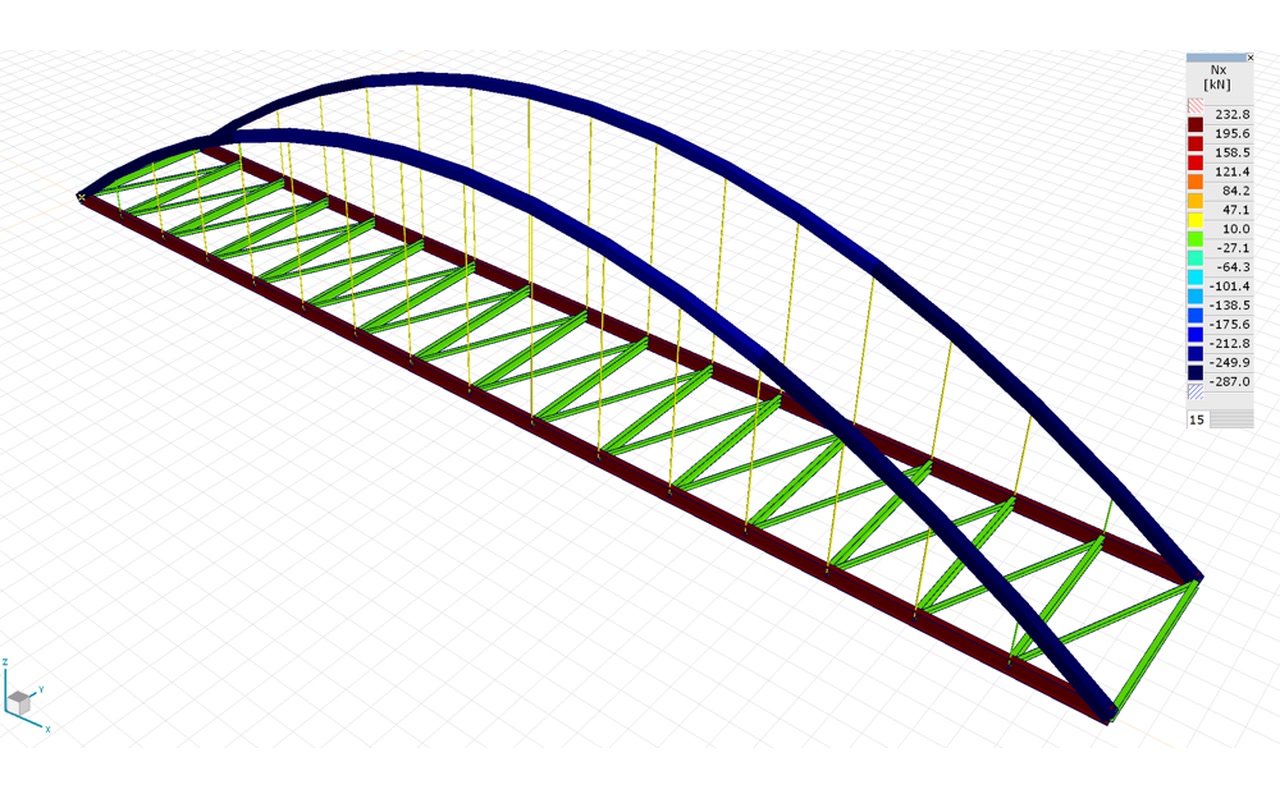
#From a sentence to a checked analysis
You ask: Model a 48 m steel arch bridge with hangers and show the axial forces.
Compression in the arches, tension in the tie beams and hangers. The colours are the axial force in every member, read from the analysis.
#How it works
The plug-in connects ChatGPT or Claude to the AxisVM window you have open. One request goes through these steps:
- It builds the model with a compact command language: one line per action for members, sections, supports and loads. Members are split where they meet, so the structure is connected.
- It runs the linear analysis in AxisVM itself, so the numbers come from the same solver you use every day.
- It reads the results as text (maximum values, reactions) and as a picture with a grid and short tags such as n5 for a node and l12 for a line, so it can point at the exact member.
- Every change is one AxisVM undo step. Ctrl+Z in AxisVM works as always.
When the compact commands are not enough, it writes Python for AxisVM's full API. Before it does, it searches the exact method signatures of the version you have installed, so it does not guess.
#Check it like any analysis
Ask for the reactions and compare them with a hand calculation. The plug-in's own test suite includes a simply supported beam where the reactions of 90 kN and the moment of 140 kNm match the hand calculation. You are still the engineer: review the model, the loads and the result.
#Things to try next
- "Add a wind load of 1 kN/m² on the arch and show the deformed shape."
- "Change the hangers to a smaller section and compare the arch force."
- "Show the reactions at the supports."